Hatch v1.10.0¶Hatch v1.10.0
Hatch v1.10.0 brings a test command, support for UV, and a Python script runner.Hatch v1.10.0 では、テストコマンド、UVのサポート、およびPythonスクリプトランナーが追加されました。
Test command¶テストコマンド
The new test command allows you to easily run tests for your project on multiple versions of Python. The default behavior follows best practices, using pytest with select plugins for test execution and coverage.py for code coverage measurement.新しい test コマンドは、複数のバージョンの Python でプロジェクトのテストを簡単に実行できるようにします。デフォルトの動作はベストプラクティスに従い、テスト実行には pytest と選択されたプラグインを使用し、コードカバレッジ測定には coverage.py を使用します。
The command is designed to be both simple to use while also satisfying the needs of most projects. For example, the following shows Hatch running tests for Jinja in all environments in the default matrix:このコマンドは、使いやすさとほとんどのプロジェクトのニーズを満たすように設計されています。例えば、以下は Jinja のすべての環境でのテストを実行する Hatch の例です。デフォルトマトリックス:

Here is us testing Rich, with a bit of configuration:ここでは、少しの設定で Rich のテストを行っています:

See the tutorial for a detailed walk-through and the config reference for options.チュートリアルを参照して詳細な手順を確認し、オプションについては 設定リファレンスを参照してください。
UV¶UV
The package installer UV, brought to you by the same folks behind Ruff, is now supported. In any environment, you can set the installer option to uv to use UV in place of virtualenv & pip for virtual environment creation and dependency management, respectively. This often results in a significant performance benefit.パッケージインストーラー UV は、Ruff の背後にいる同じチームによって提供されています。どの環境でも、installer オプションを uv に設定することで、仮想環境の作成と依存関係管理において virtualenv と pip の代わりに UV を使用できます。これにより、しばしば大幅なパフォーマンス向上が得られます。
For example, if you wanted to enable this functionality for the default environment, you could set the following:例えば、デフォルト 環境でこの機能を有効にしたい場合、次のように設定できます:
[tool.hatch.envs.default]
installer = "uv"
[envs.default]
installer = "uv"
Semi-internal environments like those used for testing and static analysis have this enabled by default.テスト や 静的解析 に使用されるような半内部環境では、デフォルトでこれが有効になっています。
See the how-to guide for more information about switching the installer.ハウツーガイドを参照して、インストーラーの切り替えに関する詳細情報を確認してください。
Python script runner¶Python スクリプトランナー
The run command now supports executing Python scripts with inline metadata as standardized by PEP 723.run コマンドは、インラインメタデータを使用して Python スクリプトを実行することをサポートするようになりました。これはPEP 723によって標準化されています。
As an example, consider the following script:例として、次のスクリプトを考えてみましょう:
# /// script
# requires-python = ">=3.11"
# dependencies = [
#   "httpx",
#   "rich",
# ]
# ///

import httpx
from rich.pretty import pprint

resp = httpx.get("https://peps.python.org/api/peps.json")
data = resp.json()
pprint([(k, v["title"]) for k, v in data.items()][:10])
If you run the script for the first time as follows:スクリプトを初めて次のように実行すると:
hatch run script.py
Hatch will create a dedicated environment for that script using a version of Python greater than or equal to 3.11 with dependencies httpx and rich.Hatch は、そのスクリプトのために、依存関係 httpx と rich を持つ Python のバージョン 3.11 以上を使用して専用の環境を作成します。
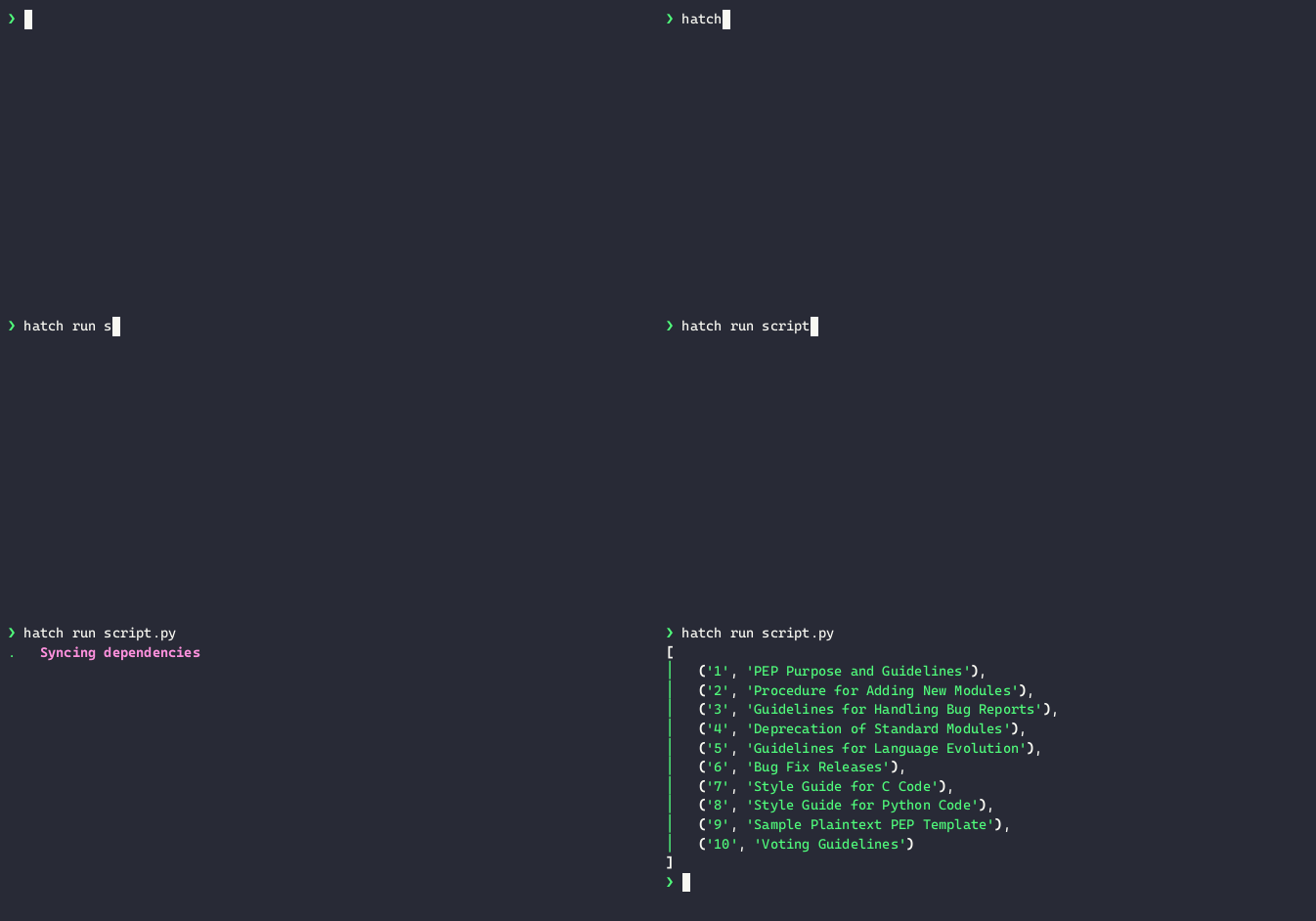
See the how-to guide for more information.詳細については、ハウツーガイドを参照してください。
Static analysis¶静的解析
The environment used for static analysis is now completely configurable such that you can fully alter the underlying behavior of the fmt command (see the how-to).静的解析に使用される環境は、完全に構成可能になり、fmt コマンドの基礎となる動作を完全に変更できます(詳細はハウツーを参照)。
Additionally, Ruff has been updated to version 1.4.0 and the rules selected by default have been updated accordingly. Check out their blog post about how the new hand-written parser has made it twice as fast!さらに、Ruff はバージョン 1.4.0 に更新され、デフォルトで選択されるルールもそれに応じて更新されました。新しい手書きパーサーがどのように2倍速くなったかについてのブログ記事をチェックしてください!
Community highlights¶コミュニティのハイライト
Visual Studio Code¶Visual Studio Code
Visual Studio Code announced support for Hatch environments in their latest release. This means that you can now easily discover and select Hatch environments for your projects directly from the editor.Visual Studio Codeは、最新のリリースでHatch環境のサポートを発表しました。これにより、エディタから直接プロジェクトのためにHatch環境を簡単に発見し、選択できるようになりました。
See the how-to guide for detailed instructions.ハウツーガイドを参照して、詳細な手順を確認してください。
CMake build plugin¶CMakeビルドプラグイン
A new release of the extension module builder scikit-build-core has introduced a build plugin for Hatchling. This means that you can use Hatchling as your build backend while also shipping extension modules built with CMake.新しいリリースの拡張モジュールビルダーscikit-build-coreが、Hatchling用のビルドプラグインを導入しました。これにより、CMakeでビルドされた拡張モジュールを配布しながら、Hatchlingをビルドバックエンドとして使用できるようになります。
To get started, add the dependency to your build requirements:始めるには、ビルド要件に依存関係を追加してください:
[build-system]
requires = ["hatchling>=1.24.2", "scikit-build-core~=0.9.3"]
build-backend = "hatchling.build"
Then explicitly enable the experimental option (acknowledging that the plugin will move to a dedicated package in the future):次に、experimentalオプションを明示的に有効にします(プラグインが将来的に専用パッケージに移行することを認識してください):
[tool.hatch.build.targets.wheel.hooks.scikit-build]
experimental = true
[build.targets.wheel.hooks.scikit-build]
experimental = true
At this point, you can create your CMakeLists.txt file as usual and start building your extension modules with CMake! Check out the dedicated example project for a complete demonstration.この時点で、通常通りにCMakeLists.txtファイルを作成し、CMakeを使用して拡張モジュールのビルドを開始できます! 完全なデモンストレーションのために、専用のサンプルプロジェクトをチェックしてください。
Meta¶メタ
Docs¶ドキュメント
The efforts toward documentation improvements have increased substantially and the priorities have shifted. From now on expect to see far more tutorials and how-to guides rather than just reference material.ドキュメント改善に向けた取り組みが大幅に増加し、優先順位が変わりました。今後は、リファレンスマテリアルだけでなく、はるかに多くのチュートリアルやハウツーガイドが期待できます。
Future¶未来
Upcoming features include:今後の機能には、
- workspaces functionality similar to CargoCargoに類似したワークスペース機能が含まれます
- commands to manage dependencies依存関係を管理するためのコマンド
- Windows release artifacts signed by the PSF (just like macOS)PSFによって署名されたWindowsリリースアーティファクト(macOSと同様)
- performance improvements for both the CLI and the Hatchling build systemCLIとHatchlingビルドシステムの両方のパフォーマンス向上
Support¶サポート
If you or your organization finds value in what Hatch provides, consider a sponsorship to assist with maintenance and more rapid development!もしあなたやあなたの組織がHatchの提供する価値を見出した場合、メンテナンスやより迅速な開発を支援するためにスポンサーシップを検討してください!