Using uv with CoiledCoiledとuvの使用
Coiled is a serverless, UX-focused cloud computing platform that makes it easy to run code on cloud hardware (AWS, GCP, and Azure).Coiledは、サーバーレスでUXに焦点を当てたクラウドコンピューティングプラットフォームで、AWS、GCP、Azureのクラウドハードウェア上でコードを簡単に実行できます。
This guide shows how to run Python scripts on the cloud using uv for dependency management and Coiled for cloud deployment.このガイドでは、依存関係管理にuvを使用し、クラウドデプロイメントにCoiledを使用して、クラウド上でPythonスクリプトを実行する方法を示します。
Managing script dependencies with uvuvを使ったスクリプト依存関係の管理
Note注意
We'll use this concrete example throughout this guide, but any Python script can be used with uv and Coiled.このガイド全体でこの具体的な例を使用しますが、任意のPythonスクリプトをuvとCoiledで使用できます。
We'll use the following script as an example:以下のスクリプトを例として使用します:
# /// script
# requires-python = ">=3.12"
# dependencies = [
#   "pandas",
#   "pyarrow",
#   "s3fs",
# ]
# ///

import pandas as pd

df = pd.read_parquet(
    "s3://coiled-data/uber/part.0.parquet",
    storage_options={"anon": True},
)
print(df.head())
The script uses pandas to load a Parquet file hosted in a
public bucket on S3, then prints the first few rows. It uses
inline script metadata to enumerate its dependencies.pandasを使用して、S3の公開バケットにホストされているParquetファイルを読み込み、最初の数行を印刷します。インラインスクリプトメタデータを使用して、その依存関係を列挙します。
When running this script locally, e.g., with:このスクリプトをローカルで実行する場合、例えば、
uv will automatically create a virtual environment and installs its dependencies.uvは自動的に仮想環境を作成し、その依存関係をインストールします。
To learn more about using inline script metadata with uv, see the script guide.uvでインラインスクリプトメタデータを使用する方法について詳しくは、スクリプトガイドを参照してください。
Running scripts on the cloud with CoiledCoiledを使用してクラウドでスクリプトを実行する
Using inline script metadata makes the script fully self-contained: it includes the information that is needed to run it. This makes it easier to run on other machines, like a machine in the cloud.インラインスクリプトメタデータを使用すると、スクリプトは完全に自己完結型になります:実行に必要な情報が含まれています。これにより、クラウド上のマシンなど、他のマシンで実行しやすくなります。
There are many use cases where resources beyond what's available on a local workstation are needed, e.g.:ローカルワークステーションで利用可能なリソースを超えるリソースが必要な多くのユースケースがあります、例えば:
- Processing large amounts of cloud-hosted dataクラウドホストされた大量のデータの処理
- Needing accelerated hardware like GPUs or a big machine with more memoryGPUのような加速ハードウェアや、より多くのメモリを持つ大きなマシンが必要
- Running the same script with hundreds or thousands of different inputs, in parallel同じスクリプトを数百または数千の異なる入力で並行して実行する
Coiled makes it simple to run code on cloud hardware.Coiledを使用すると、クラウドハードウェア上でコードを簡単に実行できます。
First, authenticate with Coiled using
coiled login :まず、coiled loginを使用してCoiledに認証します:
You'll be prompted to create a Coiled account if you don't already have one — it's free to start using Coiled.まだCoiledアカウントを持っていない場合は、作成を促されます — Coiledの使用は無料です。
To instruct Coiled to run the script on a virtual machine on AWS, add two comments to the top:CoiledにAWS上の仮想マシンでスクリプトを実行するよう指示するには、最初に2つのコメントを追加します:
# COILED container ghcr.io/astral-sh/uv:debian-slim
# COILED region us-east-2

# /// script
# requires-python = ">=3.12"
# dependencies = [
#   "pandas",
#   "pyarrow",
#   "s3fs",
# ]
# ///

import pandas as pd

df = pd.read_parquet(
    "s3://coiled-data/uber/part.0.parquet",
    storage_options={"anon": True},
)
print(df.head())
Tipヒント
While Coiled supports AWS, GCP, and Azure, this example assumes AWS is being used
(see the region option above). If you're new to Coiled, you'll automatically have
access to a free account running on AWS. If you're not running on AWS, you can either use
a valid region for your cloud provider or remove the region line above.CoiledはAWS、GCP、Azureをサポートしていますが、この例ではAWSを使用していると仮定しています
(上記のregionオプションを参照)。Coiledが初めての場合は、AWS上で動作する無料アカウントに自動的にアクセスできます。AWSで実行していない場合は、クラウドプロバイダーの有効なregionを使用するか、上記のregion行を削除できます。
The comments tell Coiled to use the official uv Docker image when
running the script (ensuring uv is available) and to run in the us-east-2 region on AWS (where
this example data file happens to live) to avoid any data egress.コメントは、スクリプトを実行する際に公式のuv Dockerイメージを使用するようCoiledに指示し(uvが利用可能であることを保証)、AWSのus-east-2リージョンで実行するように指示します(この例のデータファイルが存在する場所)データのエグレスを避けるためです。
To submit a batch job for Coiled to run, use
coiled batch run
to execute the uv run command in the cloud:Coiledにバッチジョブを実行させるには、coiled batch runを使用して、クラウドでuv runコマンドを実行します:
The same process that previously ran locally is now running on a remote cloud VM on AWS.以前はローカルで実行されていたプロセスが、今はAWSのリモートクラウドVM上で実行されています。
You can monitor the progress of the batch job in the UI at
cloud.coiled.io or from the terminal using the coiled batch status,
coiled batch wait, and coiled batch logs commands.バッチジョブの進行状況は、UIでcloud.coiled.ioを使用するか、ターミナルからcoiled batch status、coiled batch wait、およびcoiled batch logsコマンドを使用して監視できます。
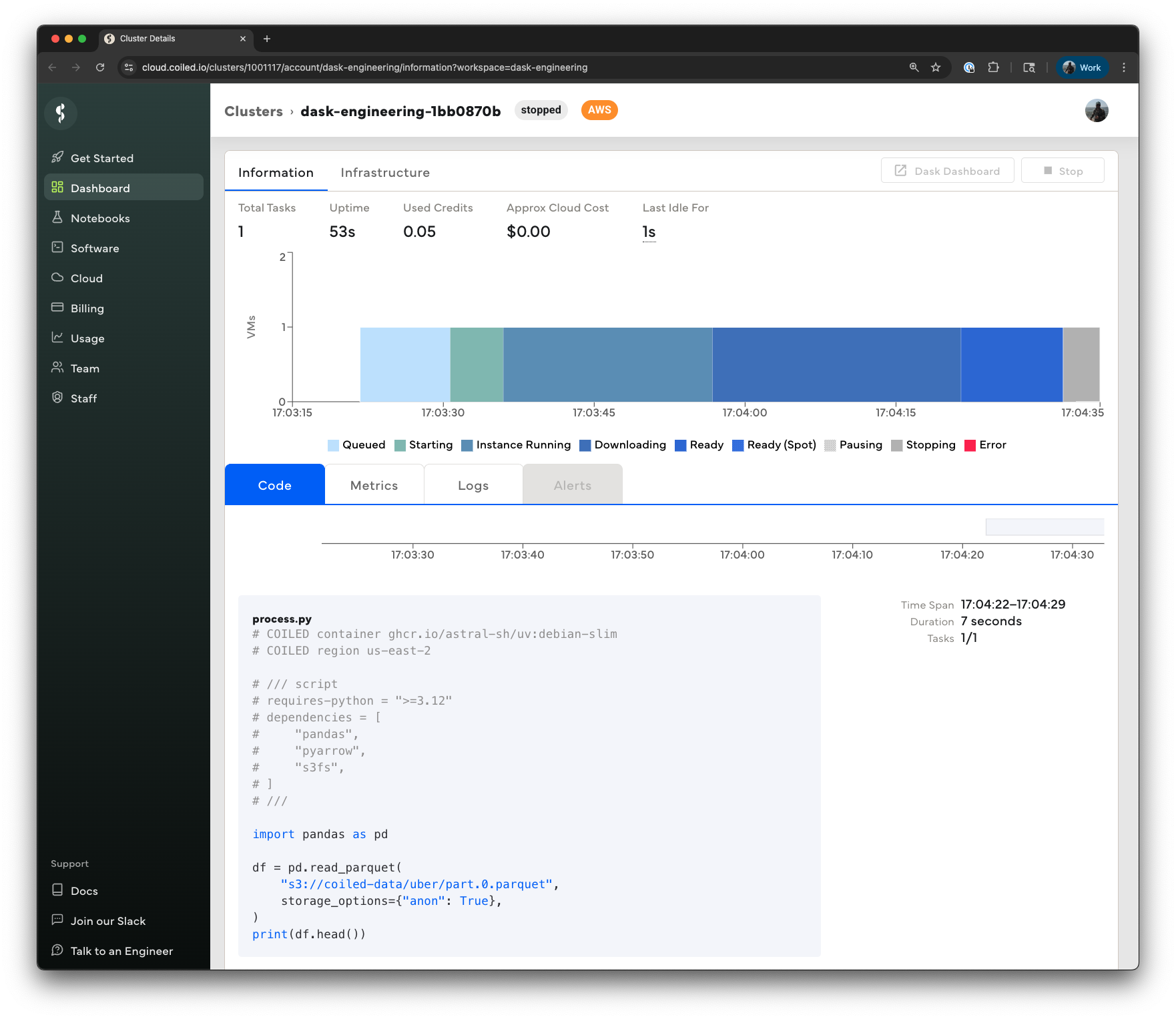
Note there's additional configuration we could have specified, e.g., the instance type (the default is a 4-core virtual machine with 16 GiB of memory), disk size, whether to use spot instance, and more. See the Coiled Batch documentation for more details.指定できる追加の設定があることに注意してください。たとえば、インスタンスタイプ(デフォルトは16 GiBのメモリを持つ4コアの仮想マシン)、ディスクサイズ、スポットインスタンスの使用の有無などです。詳細については、Coiled Batchドキュメントを参照してください。
For more details on Coiled, and how it can help with other use cases, see the Coiled documentation.Coiledの詳細や、他のユースケースにどのように役立つかについては、 Coiledのドキュメントを参照してください。