Running scriptsスクリプトの実行
A Python script is a file intended for standalone execution, e.g., with python <script>.py. Using
uv to execute scripts ensures that script dependencies are managed without manually managing
environments.Pythonスクリプトは、スタンドアロン実行を目的としたファイルであり、例えば、python <script>.pyで実行されます。スクリプトを実行するためにuvを使用すると、スクリプトの依存関係が手動で環境を管理することなく管理されます。
Note注意
If you are not familiar with Python environments: every Python installation has an environment that packages can be installed in. Typically, creating virtual environments is recommended to isolate packages required by each script. uv automatically manages virtual environments for you and prefers a declarative approach to dependencies.Python環境に不慣れな場合: すべてのPythonインストールには、パッケージをインストールできる環境があります。通常、各スクリプトに必要なパッケージを隔離するために、仮想環境を作成することが推奨されます。uvは自動的に仮想環境を管理し、依存関係に対して宣言的アプローチを好みます。
Running a script without dependencies依存関係なしでスクリプトを実行する
If your script has no dependencies, you can execute it with uv run:スクリプトに依存関係がない場合、uv runで実行できます:
Similarly, if your script depends on a module in the standard library, there's nothing more to do:同様に、スクリプトが標準ライブラリのモジュールに依存している場合、特に何もする必要はありません:
Arguments may be provided to the script:スクリプトに引数を提供することができます:
Additionally, your script can be read directly from stdin:さらに、スクリプトをstdinから直接読み取ることができます:
Or, if your shell supports here-documents:また、シェルがヒアドキュメントをサポートしている場合:
Note that if you use uv run in a project, i.e., a directory with a pyproject.toml, it will
install the current project before running the script. If your script does not depend on the
project, use the --no-project flag to skip this:注意: uv runをプロジェクト、すなわちpyproject.tomlを含むディレクトリで使用すると、スクリプトを実行する前に現在のプロジェクトがインストールされます。スクリプトがプロジェクトに依存していない場合は、--no-projectフラグを使用してこれをスキップしてください:
$ # Note: the `--no-project` flag must be provided _before_ the script name.
$ uv run --no-project example.py
See the projects guide for more details on working in projects.プロジェクトガイドを参照して、プロジェクトでの作業に関する詳細を確認してください。
Running a script with dependencies依存関係を持つスクリプトの実行
When your script requires other packages, they must be installed into the environment that the script runs in. uv prefers to create these environments on-demand instead of using a long-lived virtual environment with manually managed dependencies. This requires explicit declaration of dependencies that are required for the script. Generally, it's recommended to use a project or inline metadata to declare dependencies, but uv supports requesting dependencies per invocation as well.スクリプトが他のパッケージを必要とする場合、それらはスクリプトが実行される環境にインストールされている必要があります。uvは、手動で管理された依存関係を持つ長期間の仮想環境を使用するのではなく、必要に応じてこれらの環境を作成することを好みます。これには、スクリプトに必要な依存関係を明示的に宣言する必要があります。一般的には、依存関係を宣言するためにプロジェクトやインラインメタデータを使用することが推奨されますが、uvは呼び出しごとに依存関係を要求することもサポートしています。
For example, the following script requires rich.例えば、次のスクリプトはrichを必要とします。
import time
from rich.progress import track

for i in track(range(20), description="For example:"):
    time.sleep(0.05)
If executed without specifying a dependency, this script will fail:依存関係を指定せずに実行すると、このスクリプトは失敗します:
$ uv run --no-project example.py
Traceback (most recent call last):
  File "/Users/astral/example.py", line 2, in <module>
    from rich.progress import track
ModuleNotFoundError: No module named 'rich'
Request the dependency using the --with option:--withオプションを使用して依存関係を要求します:
Constraints can be added to the requested dependency if specific versions are needed:特定のバージョンが必要な場合、要求された依存関係に制約を追加できます:
Multiple dependencies can be requested by repeating with --with option.--withオプションを繰り返すことで、複数の依存関係を要求できます。
Note that if uv run is used in a project, these dependencies will be included in addition to
the project's dependencies. To opt-out of this behavior, use the --no-project flag.uv runがプロジェクト内で使用される場合、これらの依存関係はプロジェクトの依存関係に追加されることに注意してください。この動作を無効にするには、--no-projectフラグを使用します。
Creating a Python scriptPythonスクリプトの作成
Python recently added a standard format for
inline script metadata.
It allows for selecting Python versions and defining dependencies. Use uv init --script to
initialize scripts with the inline metadata:Pythonは最近、インラインスクリプトメタデータの標準形式を追加しました。これにより、Pythonのバージョンを選択し、依存関係を定義することができます。uv init --scriptを使用して、インラインメタデータを持つスクリプトを初期化します:
Declaring script dependenciesスクリプトの依存関係の宣言
The inline metadata format allows the dependencies for a script to be declared in the script itself.インラインメタデータ形式では、スクリプト自体で依存関係を宣言できます。
uv supports adding and updating inline script metadata for you. Use uv add --script to declare the
dependencies for the script:uvは、インラインスクリプトメタデータの追加と更新をサポートします。uv add --scriptを使用して、スクリプトの依存関係を宣言します:
This will add a script section at the top of the script declaring the dependencies using TOML:これにより、依存関係をTOMLを使用して宣言するscriptセクションがスクリプトの先頭に追加されます:
# /// script
# dependencies = [
#   "requests<3",
#   "rich",
# ]
# ///

import requests
from rich.pretty import pprint

resp = requests.get("https://peps.python.org/api/peps.json")
data = resp.json()
pprint([(k, v["title"]) for k, v in data.items()][:10])
uv will automatically create an environment with the dependencies necessary to run the script, e.g.:uvは、スクリプトを実行するために必要な依存関係を持つ環境を自動的に作成します。例えば:
$ uv run example.py
[
│   ('1', 'PEP Purpose and Guidelines'),
│   ('2', 'Procedure for Adding New Modules'),
│   ('3', 'Guidelines for Handling Bug Reports'),
│   ('4', 'Deprecation of Standard Modules'),
│   ('5', 'Guidelines for Language Evolution'),
│   ('6', 'Bug Fix Releases'),
│   ('7', 'Style Guide for C Code'),
│   ('8', 'Style Guide for Python Code'),
│   ('9', 'Sample Plaintext PEP Template'),
│   ('10', 'Voting Guidelines')
]
Important重要
When using inline script metadata, even if uv run is used in a project, the project's dependencies will be ignored. The --no-project flag is not required.インラインスクリプトメタデータを使用する場合、uv runがプロジェクト内で使用されていても、プロジェクトの依存関係は無視されます。--no-projectフラグは必要ありません。
uv also respects Python version requirements:uvはPythonのバージョン要件も尊重します:
# /// script
# requires-python = ">=3.12"
# dependencies = []
# ///

# Use some syntax added in Python 3.12
type Point = tuple[float, float]
print(Point)
Note注意
The dependencies field must be provided even if empty.dependenciesフィールドは、空であっても提供する必要があります。
uv run will search for and use the required Python version. The Python version will download if it
is not installed — see the documentation on Python versions for
more details.uv runは、必要なPythonバージョンを検索して使用します。Pythonバージョンがインストールされていない場合はダウンロードされます — 詳細についてはPythonバージョンに関するドキュメントを参照してください。
Using a shebang to create an executable fileシェバンを使用して実行可能ファイルを作成する
A shebang can be added to make a script executable without using uv run — this makes it easy to
run scripts that are on your PATH or in the current folder.シェバンを追加することで、uv runを使用せずにスクリプトを実行可能にできます。これにより、PATH上にあるスクリプトや現在のフォルダー内のスクリプトを簡単に実行できます。
For example, create a file called greet with the following contents例えば、次の内容でgreetというファイルを作成します。
Ensure that your script is executable, e.g., with chmod +x greet, then run the script:スクリプトが実行可能であることを確認してください。例えば、chmod +x greetを使用してから、スクリプトを実行します:
Declaration of dependencies is also supported in this context, for example:この文脈では依存関係の宣言もサポートされています。例えば:
#!/usr/bin/env -S uv run --script
#
# /// script
# requires-python = ">=3.12"
# dependencies = ["httpx"]
# ///

import httpx

print(httpx.get("https://example.com"))
Using alternative package indexes代替パッケージインデックスの使用
If you wish to use an alternative package index to resolve dependencies,
you can provide the index with the --index option:依存関係を解決するために代替のパッケージインデックスを使用したい場合は、--indexオプションでインデックスを指定できます:
This will include the package data in the inline metadata:これにより、パッケージデータがインラインメタデータに含まれます:
If you require authentication to access the package index, then please refer to the package index documentation.パッケージインデックスにアクセスするために認証が必要な場合は、パッケージインデックスのドキュメントを参照してください。
Locking dependencies依存関係のロック
uv supports locking dependencies for PEP 723 scripts using the uv.lock file format. Unlike with
projects, scripts must be explicitly locked using uv lock:uvは、uv.lockファイル形式を使用してPEP 723スクリプトの依存関係をロックすることをサポートしています。プロジェクトとは異なり、スクリプトはuv lockを使用して明示的にロックする必要があります:
Running uv lock --script will create a .lock file adjacent to the script (e.g.,
example.py.lock).uv lock --scriptを実行すると、スクリプトの隣に.lockファイルが作成されます(例:example.py.lock)。
Once locked, subsequent operations like uv run --script, uv add --script, uv export --script,
and uv tree --script will reuse the locked dependencies, updating the lockfile if necessary.ロックされると、uv run --script、uv add --script、uv export --script、
およびuv tree --scriptのようなその後の操作は、ロックされた依存関係を再利用し、必要に応じてロックファイルを更新します。
If no such lockfile is present, commands like uv export --script will still function as expected,
but will not create a lockfile.そのようなロックファイルが存在しない場合でも、uv export --scriptのようなコマンドは期待通りに機能しますが、ロックファイルは作成されません。
Improving reproducibility再現性の向上
In addition to locking dependencies, uv supports an exclude-newer field in the tool.uv section
of inline script metadata to limit uv to only considering distributions released before a specific
date. This is useful for improving the reproducibility of your script when run at a later point in
time.依存関係のロックに加えて、uvはインラインスクリプトメタデータのtool.uvセクションにexclude-newerフィールドをサポートしており、特定の日付より前にリリースされた配布物のみを考慮するようにuvを制限できます。これは、後の時点で実行されるスクリプトの再現性を向上させるのに役立ちます。
The date must be specified as an RFC 3339 timestamp
(e.g., 2006-12-02T02:07:43Z).日付はRFC 3339タイムスタンプとして指定する必要があります
(例:2006-12-02T02:07:43Z)。
# /// script
# dependencies = [
#   "requests",
# ]
# [tool.uv]
# exclude-newer = "2023-10-16T00:00:00Z"
# ///

import requests

print(requests.__version__)
Using different Python versions異なるPythonバージョンの使用
uv allows arbitrary Python versions to be requested on each script invocation, for example:uvは各スクリプト呼び出しで任意のPythonバージョンを要求できるようにします。例えば:
See the Python version request documentation for more details on requesting Python versions.Pythonバージョン要求のドキュメントを参照して、Pythonバージョンの要求に関する詳細を確認してください。
Using GUI scriptsGUIスクリプトの使用
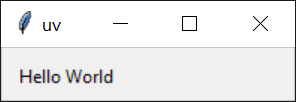
On Windows uv will run your script ending with .pyw extension using pythonw:Windowsでは、uvは.pyw拡張子で終わるスクリプトをpythonwを使用して実行します:
from tkinter import Tk, ttk

root = Tk()
root.title("uv")
frm = ttk.Frame(root, padding=10)
frm.grid()
ttk.Label(frm, text="Hello World").grid(column=0, row=0)
root.mainloop()
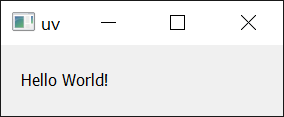
Similarly, it works with dependencies as well:同様に、依存関係でも機能します:
import sys
from PyQt5.QtWidgets import QApplication, QWidget, QLabel, QGridLayout

app = QApplication(sys.argv)
widget = QWidget()
grid = QGridLayout()

text_label = QLabel()
text_label.setText("Hello World!")
grid.addWidget(text_label)

widget.setLayout(grid)
widget.setGeometry(100, 100, 200, 50)
widget.setWindowTitle("uv")
widget.show()
sys.exit(app.exec_())
Next steps次のステップ
To learn more about uv run, see the command reference.uv run について詳しくは、コマンドリファレンスを参照してください。
Or, read on to learn how to run and install tools with uv.または、ツールを実行およびインストールする方法を学ぶために読み進めてください。