What is Docker?Dockerとは何ですか?
Docker is an open platform for developing, shipping, and running applications. Docker enables you to separate your applications from your infrastructure so you can deliver software quickly. With Docker, you can manage your infrastructure in the same ways you manage your applications. By taking advantage of Docker's methodologies for shipping, testing, and deploying code, you can significantly reduce the delay between writing code and running it in production.Dockerは、アプリケーションの開発、配送、実行のためのオープンプラットフォームです。 Dockerを使用すると、アプリケーションをインフラストラクチャから分離できるため、 ソフトウェアを迅速に提供できます。Dockerを使用すると、インフラストラクチャを アプリケーションと同じ方法で管理できます。Dockerの配送、テスト、デプロイメントの 方法論を活用することで、コードの記述と本番環境での実行の間の遅延を 大幅に短縮できます。
The Docker platformDockerプラットフォーム
Docker provides the ability to package and run an application in a loosely isolated environment called a container. The isolation and security lets you run many containers simultaneously on a given host. Containers are lightweight and contain everything needed to run the application, so you don't need to rely on what's installed on the host. You can share containers while you work, and be sure that everyone you share with gets the same container that works in the same way.Dockerは、アプリケーションをコンテナと呼ばれる緩やかに隔離された環境でパッケージ化し、実行する機能を提供します。 隔離とセキュリティにより、特定のホスト上で複数のコンテナを同時に実行できます。 コンテナは軽量で、アプリケーションを実行するために必要なすべてを含んでいるため、 ホストにインストールされているものに依存する必要はありません。作業中にコンテナを共有でき、 共有したすべての人が同じ方法で動作する同じコンテナを受け取ることができます。
Docker provides tooling and a platform to manage the lifecycle of your containers:Dockerは、コンテナのライフサイクルを管理するためのツールとプラットフォームを提供します:
- Develop your application and its supporting components using containers.コンテナを使用してアプリケーションとそのサポートコンポーネントを開発します。
- The container becomes the unit for distributing and testing your application.コンテナは、アプリケーションを配布およびテストするための単位となります。
- When you're ready, deploy your application into your production environment, as a container or an orchestrated service. This works the same whether your production environment is a local data center, a cloud provider, or a hybrid of the two.準備が整ったら、アプリケーションを本番環境にデプロイします。 コンテナまたはオーケストレーションサービスとしてです。これは、 本番環境がローカルデータセンターであろうと、クラウドプロバイダーであろうと、 その両方のハイブリッドであろうと、同じように機能します。
What can I use Docker for?Dockerは何に使えますか?
Fast, consistent delivery of your applicationsアプリケーションの迅速かつ一貫した配信
Docker streamlines the development lifecycle by allowing developers to work in standardized environments using local containers which provide your applications and services. Containers are great for continuous integration and continuous delivery (CI/CD) workflows.Dockerは、開発者がローカルコンテナを使用して標準化された環境で作業できるようにすることで、 開発ライフサイクルを効率化します。これにより、アプリケーションやサービスを提供します。 コンテナは、継続的インテグレーションおよび継続的デリバリー(CI/CD)ワークフローに最適です。
Consider the following example scenario:次の例のシナリオを考えてみてください:
- Your developers write code locally and share their work with their colleagues using Docker containers.開発者はローカルでコードを書き、Dockerコンテナを使用して同僚と作業を共有します。
- They use Docker to push their applications into a test environment and run automated and manual tests.彼らはDockerを使用してアプリケーションをテスト環境にプッシュし、自動テストと手動テストを実行します。
- When developers find bugs, they can fix them in the development environment and redeploy them to the test environment for testing and validation.開発者がバグを見つけた場合、開発環境で修正し、テストおよび検証のためにテスト環境に再デプロイできます。
- When testing is complete, getting the fix to the customer is as simple as pushing the updated image to the production environment.テストが完了すると、修正を顧客に届けるのは、更新されたイメージを本番環境にプッシュするだけで簡単です。
Responsive deployment and scalingレスポンシブデプロイメントとスケーリング
Docker's container-based platform allows for highly portable workloads. Docker containers can run on a developer's local laptop, on physical or virtual machines in a data center, on cloud providers, or in a mixture of environments.Dockerのコンテナベースのプラットフォームは、高いポータビリティを持つワークロードを可能にします。Dockerコンテナは、開発者のローカルラップトップ、データセンターの物理または仮想マシン、クラウドプロバイダー、またはそれらの混合環境で実行できます。
Docker's portability and lightweight nature also make it easy to dynamically manage workloads, scaling up or tearing down applications and services as business needs dictate, in near real time.Dockerのポータビリティと軽量性は、ビジネスニーズに応じてアプリケーションやサービスを動的に管理し、ほぼリアルタイムでスケールアップやダウンを行うことを容易にします。
Running more workloads on the same hardware同じハードウェア上でのより多くのワークロードの実行
Docker is lightweight and fast. It provides a viable, cost-effective alternative to hypervisor-based virtual machines, so you can use more of your server capacity to achieve your business goals. Docker is perfect for high density environments and for small and medium deployments where you need to do more with fewer resources.Dockerは軽量で高速です。ハイパーバイザーに基づく仮想マシンの実行可能でコスト効果の高い代替手段を提供するため、ビジネス目標を達成するためにサーバーのキャパシティをより多く活用できます。Dockerは高密度環境や、より少ないリソースでより多くのことを行う必要がある小規模および中規模のデプロイメントに最適です。
Docker architectureDockerアーキテクチャ
Docker uses a client-server architecture. The Docker client talks to the Docker daemon, which does the heavy lifting of building, running, and distributing your Docker containers. The Docker client and daemon can run on the same system, or you can connect a Docker client to a remote Docker daemon. The Docker client and daemon communicate using a REST API, over UNIX sockets or a network interface. Another Docker client is Docker Compose, that lets you work with applications consisting of a set of containers.Dockerはクライアント-サーバーアーキテクチャを使用しています。DockerクライアントはDockerデーモンと通信し、Dockerコンテナの構築、実行、配布の重い作業を行います。Dockerクライアントとデーモンは同じシステム上で実行することも、リモートのDockerデーモンに接続することもできます。Dockerクライアントとデーモンは、UNIXソケットまたはネットワークインターフェースを介してREST APIを使用して通信します。もう一つのDockerクライアントはDocker Composeで、コンテナのセットからなるアプリケーションを扱うことができます。
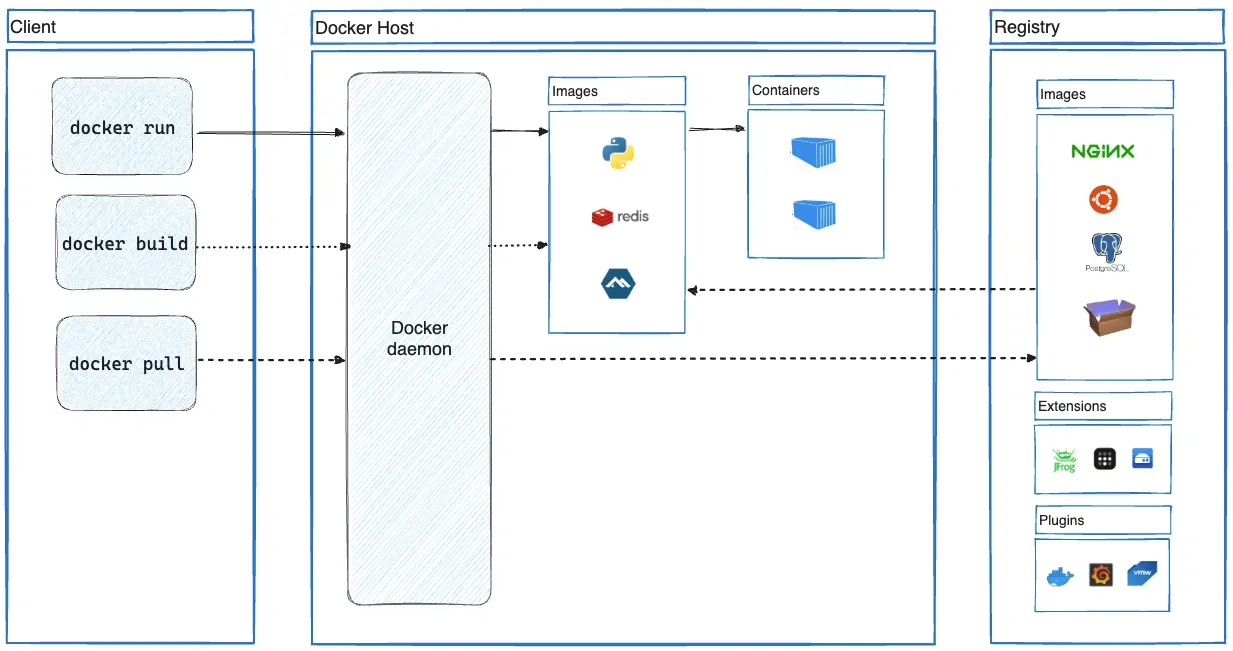
The Docker daemonDockerデーモン
The Docker daemon (dockerd) listens for Docker API requests and manages Docker
objects such as images, containers, networks, and volumes. A daemon can also
communicate with other daemons to manage Docker services.Dockerデーモン(dockerd)はDocker APIリクエストをリッスンし、イメージ、コンテナ、ネットワーク、ボリュームなどのDockerオブジェクトを管理します。デーモンは他のデーモンと通信してDockerサービスを管理することもできます。
The Docker clientDockerクライアント
The Docker client (docker) is the primary way that many Docker users interact
with Docker. When you use commands such as docker run, the client sends these
commands to dockerd, which carries them out. The docker command uses the
Docker API. The Docker client can communicate with more than one daemon.Dockerクライアント(docker)は、多くのDockerユーザーがDockerと対話するための主要な方法です。docker runのようなコマンドを使用すると、クライアントはこれらのコマンドをdockerdに送信し、それを実行します。dockerコマンドはDocker APIを使用します。Dockerクライアントは、複数のデーモンと通信できます。
Docker DesktopDocker Desktop
Docker Desktop is an easy-to-install application for your Mac, Windows or Linux environment that enables you to build and share containerized applications and microservices. Docker Desktop includes the Docker daemon (dockerd), the Docker client (docker), Docker Compose, Docker Content Trust, Kubernetes, and Credential Helper. For more information, see
Docker Desktop.Docker Desktopは、Mac、Windows、またはLinux環境に簡単にインストールできるアプリケーションで、コンテナ化されたアプリケーションやマイクロサービスを構築および共有することを可能にします。Docker Desktopには、Dockerデーモン(dockerd)、Dockerクライアント(docker)、Docker Compose、Docker Content Trust、Kubernetes、およびCredential Helperが含まれています。詳細については、Docker Desktopを参照してください。
Docker registriesDockerレジストリ
A Docker registry stores Docker images. Docker Hub is a public registry that anyone can use, and Docker looks for images on Docker Hub by default. You can even run your own private registry.DockerレジストリはDockerイメージを保存します。Docker Hubは誰でも使用できる公開レジストリであり、DockerはデフォルトでDocker Hubでイメージを探します。自分専用のプライベートレジストリを実行することもできます。
When you use the docker pull or docker run commands, Docker pulls the required images from your configured registry. When you use the docker push command, Docker pushes
your image to your configured registry.docker pullまたはdocker runコマンドを使用すると、Dockerは設定されたレジストリから必要なイメージをプルします。docker pushコマンドを使用すると、Dockerはあなたのイメージを設定されたレジストリにプッシュします。
Docker objectsDockerオブジェクト
When you use Docker, you are creating and using images, containers, networks, volumes, plugins, and other objects. This section is a brief overview of some of those objects.Dockerを使用すると、イメージ、コンテナ、ネットワーク、ボリューム、プラグイン、およびその他のオブジェクトを作成および使用しています。このセクションでは、これらのオブジェクトのいくつかについて簡単に説明します。
Imagesイメージ
An image is a read-only template with instructions for creating a Docker
container. Often, an image is based on another image, with some additional
customization. For example, you may build an image which is based on the ubuntu
image, but installs the Apache web server and your application, as well as the
configuration details needed to make your application run.イメージは、Dockerコンテナを作成するための指示を持つ読み取り専用テンプレートです。通常、イメージは別のイメージに基づいており、いくつかの追加のカスタマイズが施されています。たとえば、ubuntuイメージに基づいて、Apacheウェブサーバーとあなたのアプリケーション、およびアプリケーションを実行するために必要な設定詳細をインストールするイメージを構築することができます。
You might create your own images or you might only use those created by others and published in a registry. To build your own image, you create a Dockerfile with a simple syntax for defining the steps needed to create the image and run it. Each instruction in a Dockerfile creates a layer in the image. When you change the Dockerfile and rebuild the image, only those layers which have changed are rebuilt. This is part of what makes images so lightweight, small, and fast, when compared to other virtualization technologies.自分自身のイメージを作成することも、他の人が作成しレジストリに公開したイメージを使用することもできます。自分のイメージを構築するには、イメージを作成し実行するために必要なステップを定義するシンプルな構文のDockerfileを作成します。Dockerfileの各命令は、イメージ内にレイヤーを作成します。Dockerfileを変更してイメージを再構築すると、変更されたレイヤーのみが再構築されます。これが、他の仮想化技術と比較して、イメージが非常に軽量で小さく、速い理由の一部です。
Containersコンテナ
A container is a runnable instance of an image. You can create, start, stop, move, or delete a container using the Docker API or CLI. You can connect a container to one or more networks, attach storage to it, or even create a new image based on its current state.コンテナは、イメージの実行可能なインスタンスです。Docker APIまたはCLIを使用して、コンテナを作成、開始、停止、移動、または削除できます。コンテナを1つ以上のネットワークに接続したり、ストレージをアタッチしたり、現在の状態に基づいて新しいイメージを作成したりすることもできます。
By default, a container is relatively well isolated from other containers and its host machine. You can control how isolated a container's network, storage, or other underlying subsystems are from other containers or from the host machine.デフォルトでは、コンテナは他のコンテナやホストマシンから比較的良好に隔離されています。コンテナのネットワーク、ストレージ、または他の基盤となるサブシステムが、他のコンテナやホストマシンからどのように隔離されるかを制御できます。
A container is defined by its image as well as any configuration options you provide to it when you create or start it. When a container is removed, any changes to its state that aren't stored in persistent storage disappear.コンテナは、そのイメージと、作成または開始する際に提供する任意の構成オプションによって定義されます。コンテナが削除されると、永続ストレージに保存されていない状態の変更は消失します。
Example docker run command例 docker run コマンド
The following command runs an ubuntu container, attaches interactively to your
local command-line session, and runs /bin/bash.次のコマンドは、ubuntu コンテナを実行し、ローカルのコマンドラインセッションに対話的に接続し、/bin/bash を実行します。
$ docker run -i -t ubuntu /bin/bash
When you run this command, the following happens (assuming you are using the default registry configuration):このコマンドを実行すると、次のことが発生します(デフォルトのレジストリ構成を使用していると仮定します):
If you don't have the
ubuntuimage locally, Docker pulls it from your configured registry, as though you had rundocker pull ubuntumanually.ローカルにubuntuイメージがない場合、Dockerは構成されたレジストリからそれをプルします。これは、docker pull ubuntuを手動で実行したかのようです。Docker creates a new container, as though you had run a
docker container createcommand manually.Dockerは新しいコンテナを作成します。これは、docker container createコマンドを手動で実行したかのようです。Docker allocates a read-write filesystem to the container, as its final layer. This allows a running container to create or modify files and directories in its local filesystem.Dockerは、コンテナに対して読み書き可能なファイルシステムを最終レイヤーとして割り当てます。これにより、実行中のコンテナはローカルファイルシステム内でファイルやディレクトリを作成または変更できます。
Docker creates a network interface to connect the container to the default network, since you didn't specify any networking options. This includes assigning an IP address to the container. By default, containers can connect to external networks using the host machine's network connection.Dockerは、ネットワーキングオプションを指定しなかったため、コンテナをデフォルトネットワークに接続するためのネットワークインターフェースを作成します。これには、コンテナにIPアドレスを割り当てることが含まれます。デフォルトでは、コンテナはホストマシンのネットワーク接続を使用して外部ネットワークに接続できます。
Docker starts the container and executes
/bin/bash. Because the container is running interactively and attached to your terminal (due to the-iand-tflags), you can provide input using your keyboard while Docker logs the output to your terminal.Dockerはコンテナを起動し、/bin/bashを実行します。コンテナは対話的に実行され、あなたのターミナルに接続されているため(-iおよび-tフラグによる)、キーボードを使用して入力を提供でき、Dockerは出力をあなたのターミナルにログします。When you run
exitto terminate the/bin/bashcommand, the container stops but isn't removed. You can start it again or remove it.あなたがexitを実行して/bin/bashコマンドを終了すると、コンテナは停止しますが、削除されません。再度起動することも、削除することもできます。
The underlying technology基盤技術
Docker is written in the Go programming language and takes
advantage of several features of the Linux kernel to deliver its functionality.
Docker uses a technology called namespaces to provide the isolated workspace
called the container. When you run a container, Docker creates a set of
namespaces for that container.DockerはGoプログラミング言語で書かれており、その機能を提供するためにLinuxカーネルのいくつかの機能を活用しています。Dockerは、コンテナと呼ばれる隔離された作業スペースを提供するためにnamespacesという技術を使用します。コンテナを実行すると、Dockerはそのコンテナのために一連のnamespacesを作成します。
These namespaces provide a layer of isolation. Each aspect of a container runs in a separate namespace and its access is limited to that namespace.これらのnamespacesは、隔離のレイヤーを提供します。コンテナの各側面は別々のnamespaceで実行され、そのアクセスはそのnamespaceに制限されます。

